Connect operations and map data
A chain is built from two separate actions on the canvas: connecting nodes to set the order they run in, and mapping fields to pull a value from an earlier step's response. They're independent — keep them that way in your head and the canvas stops being confusing. Connecting comes first: a field can only map from a node already reachable by a connection, so there's nothing to map from until you've wired the canvas up.
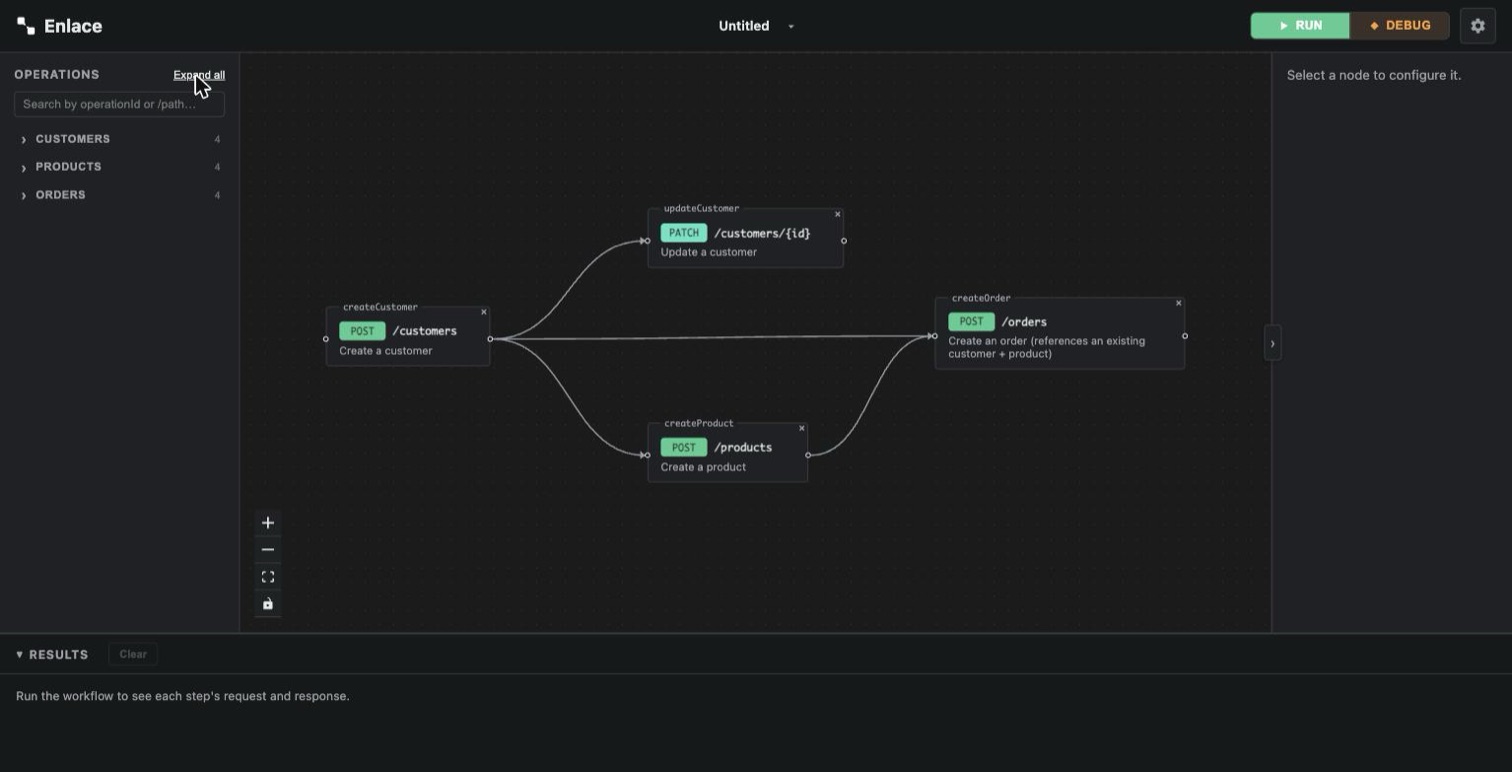
Set the order: connect nodes
Drag from one node's connect handle to another's. This draws a solid arrow and means exactly one thing: the first node must finish before the second starts. No data moves along it.
You can connect nodes purely for sequencing — e.g. "delete this order before creating its replacement" — even when no field actually needs a value from the earlier one.
Click a connector to select it, then press Delete/Backspace to remove it — same as removing a node. A field mapping isn't removed this way; clear it from the field itself instead (see below).
Pull in a value: map a field
Every request field — a path param, a query param, a header, or the
body — is a small text editor. Type {{ inside it and a menu opens:
- Which upstream request to pull from — any node reachable from this one by a connection (drawn directly, or transitively through others).
- What to pull — a JSONPath filter into the response body (with autocomplete over the fields that response actually has), the whole raw response body, a specific response header, or the response's status code.
- A live preview of the resolved value, using the last time you ran the chain.
Confirm it and the typed {{ becomes a chip inline in the field —
something like POST /customers (a1b2c3) → id — instead of raw text.
Click a chip to edit or remove it.
Only nodes already reachable by a connection show up as candidates in step 1 — this is why connecting comes first. A mapping itself adds no ordering of its own; the connection you already drew is what the run order actually comes from. (Two things behave differently: an Assert preset's checks and a credential's per-node extra-param override both imply their own ordering even with no connection drawn — see Add a Wait or an Assert step and Credential types.)
You're not limited to the node directly before this one. In a chain
A → B → C, C can map a field straight from A, skipping B
entirely, as long as A is a real ancestor in the connection graph.
If a chip's source node gets deleted from the canvas, it turns visibly red rather than silently resolving to nothing the next time you run.
What you can map from
- Nested fields work at any depth — a response's
address.cityshows up in the autocomplete as its own entry, not just top-level fields. - Array fields offer two things in that autocomplete: the whole array
as a single JSONPath (only useful mapped into an array-typed target),
and — one level in — the first item's own fields, e.g.
items[0].id. Need a different index, or to filter the list some other way? Type the JSONPath by hand — the autocomplete is a shortcut, not a hard limit. - The response fields offered are the ones the schema actually declares with a matching shape — but since every field here is plain typed text, nothing stops you from typing a path the autocomplete doesn't suggest. The live preview in the mapping menu is the real check.
Cleaning up
Delete a node and anything that referenced it — connections, mappings — is removed automatically. Nothing is left silently dangling.
Keeping a busy canvas readable
Once a chain has more than a few nodes, drag one on top of another to group them into a single named, collapsible cluster — connections and mappings work exactly the same either way.