Save and share a workflow
This browser already remembers your last session on its own — see
Autosave below.
Export to a .enlace file when you want to actually keep a copy, hand
it to a teammate, or check it into a repo alongside the API it exercises.
Open the Settings menu (the gear icon in the header) for both Export and Import.
The workflow's own name — shown center-header, next to the chevron — is separate from the export filename. Click it to rename the workflow itself at any time; that name is what a later export defaults to.
Export
Export is disabled until there's at least one node on the canvas. Give the collection a name — it defaults to the workflow's own name, or the OpenAPI document's title if you haven't named the workflow yet — then choose how credentials go out:
- Partial (recommended) — credential names and configuration (type, token URL, field names, ...) come along, but tokens, passwords, keys, and client secrets are stripped. Whoever imports it gets the same credential cards, empty, and fills in their own secrets. This mode is never encrypted — there's nothing sensitive in it to protect.
- Full credentials — every actual secret is included, so the workflow runs immediately for whoever imports it. Because that's a file that can authenticate as you, this mode is always password-encrypted: set a password (at least 8 characters, typed twice) and Enlace encrypts the file with it before downloading. Share the file and the password through different channels, and don't commit it to source control regardless — the point of encryption is that neither the file nor the password alone is enough, not that it's safe to publish.
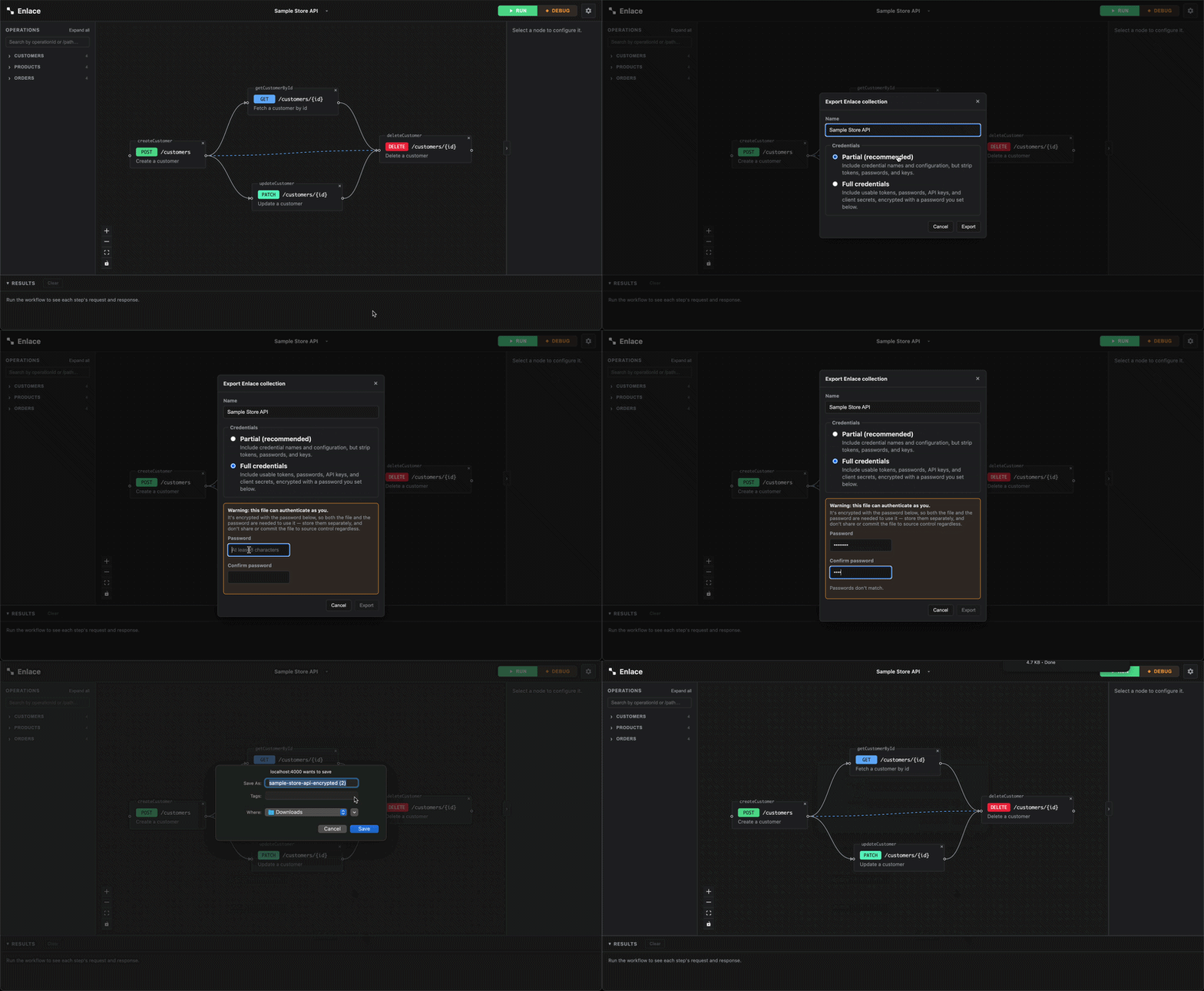
Full-credential export needs a secure context (HTTPS, or localhost
in dev) — crypto.subtle, which does the actual encryption, isn't
available otherwise. If your Enlace instance is served over plain HTTP
(common for a pre-prod server), that option is disabled with an
explanation instead of silently failing.
Import
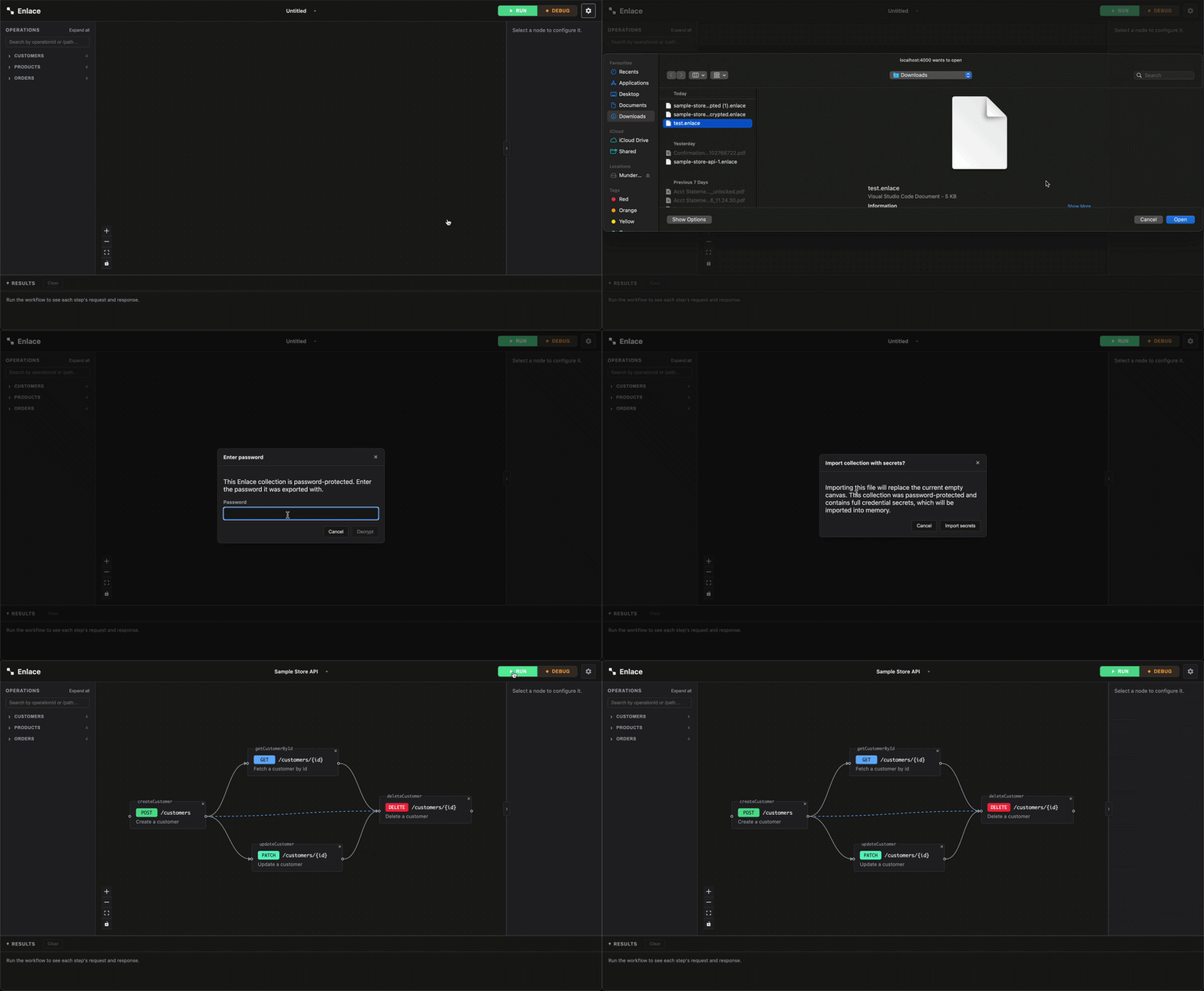
Pick a .enlace file. If it's password-protected, Enlace prompts for
the password before it can read anything else about the file — get it
wrong and decryption fails outright rather than importing garbage.
Importing replaces the current canvas. If you have unsaved work, Enlace tells you how many nodes are about to be replaced before it commits to anything.
- Importing a Partial export leaves every credential's secret empty — you'll need to fill those back in from the Credentials panel before running anything that needs them.
- Importing a Full credentials export brings real, usable secrets into this tab's memory. Enlace says so explicitly before you confirm.
- An operation the collection references that no longer exists in the currently-loaded spec is reported, not silently dropped or guessed-around.
What's actually in the file
A .enlace file is versioned JSON: the workflow's nodes, connections,
canvas positions, and any groups (names,
membership, collapsed state), plus its credentials (stripped or full,
per the export choice you made) and a hint about the spec it was built
against (title, version, the operation IDs it uses). It's plain, readable JSON
for a Partial export; a Full-credential export wraps that same JSON in
an encrypted envelope — nothing readable without the password.
A file exported by an older Enlace build, from before password encryption existed, may still carry secrets in plain text. Importing one of those surfaces a loud one-time warning that it was never encrypted, rather than treating it like a normal Partial import.
Autosave: this browser remembers your last session
Separately from exporting, Enlace also saves your work to this browser's own local storage (IndexedDB) as you go — a refresh or an accidentally-closed tab doesn't lose your canvas the way it used to. This is automatic and silent: there's no button for it, and reopening Enlace in this browser restores your last session without asking.
What it saves is the same shape as a Partial export — nodes, connections, positions, groups, presets, the workflow's name, and credential cards (never secrets). If a restored credential needs a secret, you get the same "needs secrets" prompt an import shows — this is a convenience net, not a way around credentials never touching disk.
The last run's result is saved too, specifically so Rerun failed still has something to resume from after a refresh — written once the run actually finishes (not live, mid-run), and cleared the moment a different workflow loads.
A few real limits worth knowing:
- One slot, not a list. This isn't a way to keep several workflows
side by side locally — loading or importing a different one overwrites
what was here. Export a
.enlacefile first if you want to keep more than one around. - This browser only. Nothing here follows you to a different browser, device, or even a different profile in the same browser — for that, export and share the file.
- Canvas pan/zoom position and breakpoints aren't included — those reset on reload even though everything else comes back.